
Samsung My Files
Screenshots
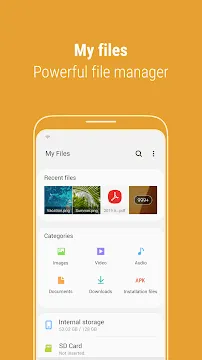
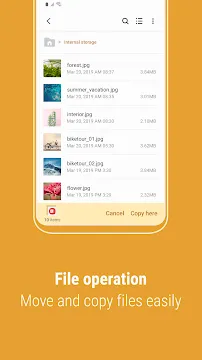
Samsung My Files is a highly efficient, system-optimized utility created to help smartphone users track and sort their data seamlessly. It presents an intuitive interface that simplifies file exploration across both internal storage and attached hardware. Instead of sorting through random data paths, this application groups your content neatly into distinct, easily recognizable folders. It handles daily tasks like copying, moving, and zipping files with zero delay. The utility comes pre-installed on many devices, removing the need to find untrusted third-party alternatives. By emphasizing clean layouts and fast processing, the software helps you maintain an orderly data library with minimal effort.
Navigating the Intuitive Categories of Samsung My Files
The greatest strength of Samsung My Files is how it handles the initial screen presentation. When you launch the application, it greets you with a clearly labeled dashboard split into various file types. You can quickly view categorized groups such as Images, Videos, Audio, Documents, and Downloads. This system means you never have to remember the exact folder path where an internet browser or messaging application saved a specific picture.
Additionally, the application maintains a dedicated “Recent Files” list right at the top of the screen. This section updates dynamically, displaying the items you downloaded, modified, or viewed within the last few minutes. This layout is incredibly practical for workers who need to view an emailed PDF or edit a fresh screenshot immediately. The software cuts out extra clicks, streamlining your daily workflow significantly.
How to Optimize Hardware Storage with Samsung My Files
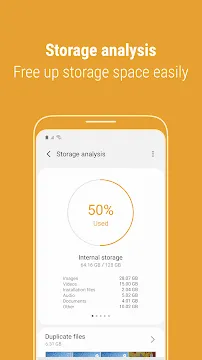
Keeping your device running quickly requires consistent disk management. The Samsung My Files utility includes an advanced “Analyze Storage” module that gives a complete visual breakdown of your space. By selecting this option, you can instantly see which file types consume the largest chunk of your internal memory.
- Duplicate Detection: The scanner highlights identical pictures and documents so you can delete clones instantly.
- Large File Filtering: It lists individual massive items, letting you remove forgotten movie files or old software installers.
- Unused App Tracking: The tool identifies apps you have not opened in months to help you free up system space.
- Cache Clearing: You can wipe temporary system data to resolve minor lag and reclaim blocks of megabytes.
Regularly executing these built-in maintenance routines prevents your device from triggering “storage full” warnings. It ensures that the operating system has plenty of room to execute background tasks efficiently.
Expanding Storage Boundaries Through Cloud Services
Modern data management often extends past physical hardware boundaries. Samsung My Files integrates directly with major cloud storage services like Google Drive and Microsoft OneDrive. You can link your online accounts directly within the local manager interface to view your remote repositories.
This integration lets you drag, drop, and copy files from your physical phone storage directly into a secure cloud folder. It saves you from constantly switching between different standalone cloud apps to compare directories. Furthermore, the application’s storage analyzer also tracks how much space you have left on those remote servers. This comprehensive overview ensures you always know the exact status of your digital assets, whether they are local or cloud-based.
Securing Sensitive Data with Password Compression
Data privacy is a major consideration for individuals who carry work documents or private personal information on their phones. Recent updates to Samsung My Files introduce advanced safety measures during standard archive creation. When you select a group of files and compress them into a ZIP archive, the utility allows you to establish a custom password.
This encryption layer keeps your data safe if you need to email sensitive files or back them up to public servers. Unzipping these files later requires entering the exact password phrase, giving you absolute control over who views the content. This built-in security feature eliminates the necessity of downloading separate encryption programs. It provides peace of mind directly within the native operating system environment.
Advanced Search Logic and Favorite Folders
Locating an obscure document inside a device with 256GB of data can feel overwhelming. Fortunately, the search feature within Samsung My Files employs smart indexing to deliver rapid results. You can type keywords or filter your search based on file extensions and modification dates.
Moreover, the latest versions allow you to manage your “Favorites” list on the fly. While you are browsing the internal storage tree, you can immediately add or remove directories from your quick-access panel. The interface displays the complete path route clearly as you check folders. This visual guide prevents you from getting lost in deep system subfolders and helps you pinpoint data instantly.
Conclusion
Samsung My Files stands as a definitive solution for anyone wanting total organization over their mobile content. It bridges the gap between deep system directory access and simple, category-based browsing. With unique features like password-protected compression, duplicate file scanning, and cross-cloud integration, it satisfies both casual users and tech enthusiasts. The dual-pane flexibility on larger screens and the helpful Recent Files tracker make file navigation remarkably comfortable. Utilizing these free, built-in capabilities helps you maximize your device performance and protect private records. It remains a mandatory tool for keeping your mobile digital life orderly, clean, and completely secure.